
User guide


Getting to Know Your WIP310
Using Your Phone’s Hardware Features
Cisco WIP310 User Guide 18
1
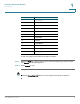
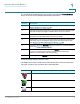
Indicates that there are new message(s) waiting.
Indicates that the speaker phone is in use.
Indicates that the handset or headset is in use.
Indicates that the phone ringer is off.
Appears when you are accessing the phone volume control.
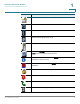
Identifies the Settings menu or button. In the Home screen, press the
Select button to access the settings menu.
Displays phone information. Press the Select button for more
information on the menu item.
Enables Do Not Disturb. Press the Select button to enable or disable Do
Not Disturb.
Indicates that the phone is locked.
Indicates that you have an incoming call.
Indicates that dialing is in progress.
Indicates that a call is progressing.
Icon Description