
User guide


Getting to Know Your WIP310
Entering Text
Cisco WIP310 User Guide 14
1
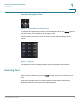
To exit to a previous menu without saving information:
STEP 1 Press the Back key multiple times until you reach the beginning of the text field.
The Cancel soft key then appears.
STEP 2 Press Cancel to exit.
TIP Press the Power/End Call button to return to the Home screen at any time.
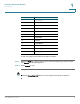
Key Character Set
1 1 / : \ , ! ; $ ^ |
2abc2ABC
3def3DEF
4ghi4GHI
5jkl5JKL
6mno6MNO
7pqrs7PQRS
8tuv8TUV
9wxyz9WXYZ
0 Space 0 ~ ? > ‘ < “
* . @ * & % [ ] _
#/P # + - = ( ) { }