
User guide



Chapter 5
Cisco SPA9000 Voice System Features
30
Wireless-G IP Phone
Using the Corporate Directory
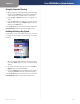
After navigating to 1. Corporate Directory in the Settings
menu, press the Select button. The phone looks for the
corporate directory. If it finds entries, a list appears.
Press the 2. Up or Down Arrow key to navigate to a
name.
Press the 3. Call button to place the call. (To edit the
number before calling, press Options. Edit the number,
then press the Call button.)
Press the Back soft key to move back one screen. Press the
Power/End Call button to return to the Home screen.
Enabling the Linksys Key System
If your phone is part of a Linksys Key System, you need
to enable the key system to access Linksys Key System
functions.
Settings > Misc Settings
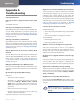
After navigating to 1. Misc Settings in the Settings menu,
press the Select button to see the Misc Settings
options.
To enable the Linksys Key System, press the 2. left or
Right Arrow key to select ON or OFF.
Press the 3. Select button (check mark icon) to confirm
or press the Cancel soft key to exit without changes.
Press the Back soft key to move back one screen. Press the
Power/End Call button to return to the Home screen.