
User guide



Chapter 5
Cisco SPA9000 Voice System Features
29
Wireless-G IP Phone
Chapter 5: Cisco SPA9000
Voice System Features
This chapter contains information about Cisco SPA9000
Voice System-specific functions of the WIP310. The
Cisco SPA9000 Voice System (formerly called the Linksys
Voice System) is an Internet telephony phone system for
small businesses that provides features such as shared
telephone lines, paging, call parking, and hunt groups.
If your WIP310 is used in a small business environment,
it may be part of a Cisco SPA9000 Voice System. Contact
your system administrator for more information.
NOTE: Cisco SPA9000 Voice System features
work only if your Wireless IP Phone is part of a
Cisco SPA9000 Voice System and the phone is
registered to a SPA9000. Consult your system
administrator if you need more information.
Picking Up a Call at a Specific Extension
You can pick up a call that is ringing at another extension.
Depending on the way your phone network is configured,
you can pick up a call ringing at any extension, or you may
have a group of phones configured where members of the
group can pick up a call ringing at any group member’s
phone.
To pick up a call ringing at a specific extension:
From the Home screen, enter the pickup star code (1. 36)
and the extension number of the ringing phone.
Press the 2. Call button.
Picking Up a Call at an Extension in a Group
To pick up a call ringing at an extension in your group of
phones:
From the Home screen, enter the group pickup star 1.
code (37). A list of phone calls to extensions in the
group displays.
Select the extension whose call you want to pick up 2.
and press the Call button.
Parking a Call
If your phone is part of a Cisco SPA9000 Voice System, you
may have this feature. You can “park,” or place a call on
hold on a line. You can then “unpark” or retrieve the call
from your wireless IP phone.
To park a call:
While in a call, press 1. Options and navigate to New
Call.
Dial 2. *38 and then a number to park the call. This
number can be any number; choose one that is easy to
remember. (For example, *1001.)
Press the 3. Call button. The call is parked on the line
number that you entered; the caller hears on-hold
music.
Retrieving Parked Calls
If your phone is part of a Cisco SPA9000 Voice System,
you may have this feature. You can “unpark” or retrieve a
parked call from your wireless IP phone.
To retrieve a parked call:
If you know the parked line number:
Dial 1. *39 and the number of the line on which the call
is parked. (For example, *1001.)
Press the 2. Call button. The parked call is transferred to
your phone.
If you do not know the parked line number:
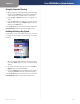
In the 1. Settings menu, navigate to Call Park Status
and press the Select button. The screen displays
information about any parked calls, including the
extension number of the person who parked the call;
the name of the caller, and the park line number.
Use the arrow keys to navigate to the call you want to 2.
retrieve, then press the Call button to unpark the call.
The call is transferred to your phone.
Press the Back soft key to move back one screen. Press the
Power/End Call button to return to the Home screen.
Using Paging
Your WIP310 can automatically answer pages from other
Cisco SPA phones in the Cisco SPA9000 Voice System.
When your WIP310 is paged, the phone emits a series of
beeps, and two-way audio is established between your
phone and the phone that called you. You do not have to
accept the page.
You can page another extension in the Cisco SPA9000
Voice System with your WIP310. To page another phone:
Dial 1. *96, then the extension of the phone you are
paging.
Press the 2. Call button.