
Datasheet






Administration Settings
User List
Cisco SRP500 Series Services Ready Platforms Administration Guide (SRP520 Models) 204
8
User List
Use the User List page to manage the users who have access to the Configuration
Utility.
There are two default accounts, admin and cisco. The admin account has
administrator-level access. The cisco account has guest-level access.
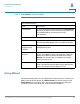
STEP 1 Click Administration > User List. The User List window opens.
STEP 2 Click the Edit (pencil) icon for the account that you want to change.
The User Account window opens.
STEP 3 Enter a new username.
NOTE The admin and cisco default usernames cannot be changed.
STEP 4 Enter the old password (only applies to the Admin account). You will be asked for
your old password when you change the password.
STEP 5 Enter and confirm a new password. The maximum number of characters is 32.
• The default administrator password is admin.
• The default guest password is cisco.
NOTE You will also be asked for your new password when you access the
Configuration Utility. For security purposes, Cisco strongly recommends
changing the password.
STEP 6 Click Submit to save your settings.
User Privilege Control
The Privilege Control page allows the Administrator to adjust the privileges
assigned to the user.
STEP 1 Click Administration > User Privilege Control. The User Privilege Control window
opens.
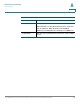
STEP 2 Choose one of these access types for each feature.