
Datasheet






Administration Settings
Setup Wizard
Cisco SRP500 Series Services Ready Platforms Administration Guide (SRP520 Models) 203
8
STEP 5 Click Submit to save your settings.
Setup Wizard
The Setup Wizard guides you through the basic steps required to configure your
SRP. To start the Setup Wizard, click Administration on the tab and then click
Setup Wizard in the navigation pane. The Setup Wizard appears. Follow the
instructions on the Setup Wizard to continue with the installation.
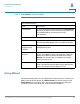
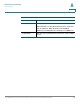
Time Setup Settings
Field Description
User Manual To setup the system clock manually, select User Manual
and enter the date and time zones. Enter the date format
as "Year/Month/Day" and the time format as:
"Hour:Min:Sec."
Time Zone
Regions Enter your regions time zone form the drop-down list.
For example: (GMT-8:00) Pacific Time (USA & Canada).
Adjust Clock for
Daylight Saving
Changes
Select this option for the SRP to automatically adjust for
daylight savings time.
Time Server
Address
To use the SRP’s default Network Time Protocol (NTP)
server, select Auto from the drop-down list. This is the
default. If you want to specify the NTP server, select
Manual, and enter the URL or IP address of the NTP
server you want to use.
Resync Timer Enter the Resync timer interval value (in seconds). This
timer controls how often the SRP resyncs with the NTP
server. The default setting is 3600 seconds.