
Datasheet






Administration Settings
Time Setup
Cisco SRP500 Series Services Ready Platforms Administration Guide (SRP520 Models) 202
8
Time Setup
Use the Time Setup page to set the time zone parameters for your network. You
can configure the system time manually or configure it by using the Network Time
Protocol (NTP) server.
STEP 1 Click Administration > Time Setup. The Time Setup window opens.
STEP 2 Specify the settings for your time zone. Time zone is usually referred to as the local
time.
STEP 3 To setup the system clock manually, select User Manual and enter the date and
time zones. Enter the date format as "Year/Month/Day" and the time format as:
"Hour:Min:Sec."
STEP 4 To automatically set the time, configure the time zone settings as defined in the
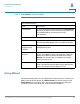
Time Setup Settings table.
File Enter the name of the remote file.
Save As Enter the filename for the file you are saving.
User Name Enter a user name to access the remote file
User Password Enter a password to access the remote file.
Timeout Specify the session timeout value (in seconds). This is
the maximum time allowed for a connection session.
The connection timeout for HTTP and FTP sessions is 3
seconds.The connection timeout for TFTP is 1 second.
For HTTP and FTP, is a TCP reset response message
will terminate a session.
Retry Specify the number of sessions that will retry if a
transient problem occurs in a session
Status The status of the processing remote file.
File List table Shows the name and size of the remote file.
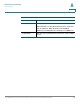
Local TFTP Settings
Field Description