
Datasheet






Administration Settings
Remote Management
Cisco SRP500 Series Services Ready Platforms Administration Guide (SRP520 Models) 201
8
Local TFTP
Use the Local TFTP page to enable the SRP to be a TFTP server. When you enable
TFTP, you can download files to the SRP remotely and then use it as a local TFTP
server to serve files to hosts on the LAN such as IP phones.
STEP 1 Click Administration > Remote Management > Local TFTP. The Local TFTP
Control window opens.
STEP 2 To enable TFTP, select Enabled.
STEP 3 Click Submit to save your settings.
STEP 4 Enter the Remote File Settings as defined in the Local TFTP Settings table.
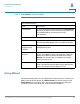
eth0.4080 through
eth0.4083
Internal bridged connections to ADSL PVC1–4
eth0.4093 Internal Connection to ADSL modem
wifi0 Internal Connection to wireless access point
ifb0 Not currently used
fb1 Not currently used
mast0 Not currently used
SRP500 Internal Interfaces
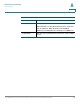
Local TFTP Settings
Field Description
TFTP Select Enabled to enable TFTP. The default is disabled.
Get Remote File Settings
Interface The interface used to get the remote file.
URL Enter the URL where the remote file resides. For
example: http://www.yoursite.com:port/path/filename
ftp://username:password@yoursite:port/path/filename.