
Datasheet





Configuring Voice
Configuring Voice Settings
120 Cisco SRP500 Series Services Ready Platforms Administration Guide (SRP520 Models)
6
SIP Page
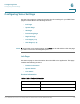
Use the SIP page to configure numerous SIP parameters and values. This page
includes the following sections:
• SIP Parameters
• SIP Timer Values
• Response Status Code Handling
• RTP Parameters
• SDP Payload Types
• NSE Dynamic Payload
SIP Parameters
Voice > SIP > SIP Parameters
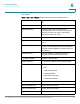
Debug Level Determines the level of debug information that will
be generated. Select 0, 1, 2, 3 or 3+Router from the
drop-down list. The higher the debug level, the
more debug information will be generated. The
default is 0, which indicates that no debug
information will be generated. Levels 1, 2 & 3
generate messages related to the voice ports only.
3+Router generates debug content for both voice
and router components. To configure the logging
options, go to the Administration > Log pages.
Max Forward Max Forward value, which can range from 1 to
255.
The default is 70.
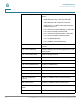
Max Redirection Number of times an invite can be redirected to
avoid an infinite loop.
The default is 5.
Max Auth Maximum number of times (from 0 to 255) a
request may be challenged.
The default is 2.