
System information




Installing the UC 320W and Phones
Mounting a Phone to a Wall (Optional)
Cisco Unified Communications UC320W Administration Guide 111
B
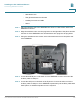
STEP 1 To attach the Mounting Bracket (MB), align the two cleats on the MB with the holes
in the phone’s base.
STEP 2 Orient the MB such that the phone’s Ethernet and handset ports are accessible
after installation.
STEP 3 Push the MB onto the phone’s base. Slide the MB upwards to lock it in place.