
Specifications


2-681
Cisco SCE 8000 CLI Command Reference
Chapter 2 CLI Command Reference
subscriber sm-connection-failure
subscriber sm-connection-failure
Configures the behavior of the system if communication fails between the SM and the Cisco SCE
platform.
subscriber sm-connection-failure {warning | action {force-failure | none | remove-mappings |
shut}}
subscriber sm-connection-failure timeout timeout
default subscriber sm-connection-failure
Syntax Description
Command Default None
Command Modes Interface Linecard Configuration
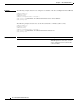
Command History This table includes the following release-specific history entries:
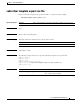
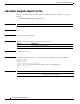
Usage Guidelines If SM functionality is not critical to the operation of the system, no action needs to be configured.
If SM functionality is critical to the operation of the system, configure forced failure of the Cisco SCE
platform in the event of any loss of connection with the SM.
If no action is required, you may want to configure the system operational status to be set to “warning”
when communication is lost. Use the warning keyword for this option.
Authorization: admin
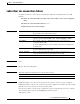
timeout Timeout interval, in seconds, after which a failure condition is detected that
the specified action is taken by the system.
warning Sets the system operational status to “warning” when the link is down.
action Requests the system to respond in a certain way depending on which of the
options is specified (force-failure, none, remove-mappings, or shut).
force-failure Forces failure of the Cisco SCE platform in the event of any loss of
connection with the SM.
the Cisco SCE platform then acts according to the behavior configured for
the failure state.
none No action needs to be taken in the event of any loss of connection between
the Cisco SCE platform and the SM.
remove-mappings Removes all current subscriber mappings in the event of any loss of
connection between the Cisco SCE platform and the SM.
shut SCE platform shuts down and quits providing service.
Release Modification
3.0.3 This command was introduced.