
Specifications





2-555
Cisco SCE 8000 CLI Command Reference
Chapter 2 CLI Command Reference
show pqi last-installed
show pqi last-installed
Displays the name of the last pqi file that was installed.
show pqi last-installed
Syntax Description This command has no arguments or keywords.
Command Default None
Command Modes User EXEC
Command History This table includes the following release-specific history entries:
Usage Guidelines Authorization: viewer
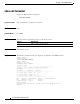
Examples The following example shows how to find out which pqi file is installed:
SCE8000>enable 5
Password:<cisco>
SCE8000>show pqi last-installed
package name: SACS BB
package version 3.0.1. build 02
package date: Tue Jun 10 17:27:55 GMT+00:00 2006
operation: Upgrade
SCE8000>
Related Commands
Release Modification
2.5.7 This command was introduced.
Command Description
pqi rollback file Reverses an upgrade of the specified pqi file.
pqi uninstall file Uninstalls the specified pqi file.