
Specifications




2-518
Cisco SCE 8000 CLI Command Reference
Chapter 2 CLI Command Reference
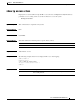
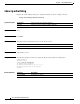
show ip advertising
show ip advertising
Displays the status of IP advertising, the configured destination, and the configured interval.
show ip advertising [destination | interval]
Syntax Description
Command Default None
Command Modes User EXEC
Command History This table includes the following release-specific history entries:
Usage Guidelines Authorization: viewer
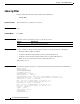
Examples The following example shows how to display the IP advertising status and configuration:
SCE8000>enable 5
Password:<cisco>
SCE8000>show ip advertising
IP advertising is disabled
IP advertising destination is 10.10.10.10
IP advertising interval is 853 seconds
SCE8000>
Related Commands
destination Displays the IP advertising destination.
interval Displays the interval between ping commands.
Release Modification
2.5.7 This command was introduced.
Command Description
ip advertising Enables IP advertising.