
Specifications




2-145
Cisco SCE 8000 CLI Command Reference
Chapter 2 CLI Command Reference
enable
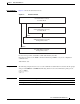
Usage Guidelines Figure 2-2 shows the authorization levels.
Figure 2-2 Enable Command
If a level is not specified, it defaults to admin authorization (level 10).
Note that you cannot use the enable command from Privileged EXEC or any of the configuration
command modes.
Authorization: user
Examples The following example shows how to access the administrator authorization level. Note that the prompt
changes from SCE8000> to SCE8000#, indicating that the level is the administrator privilege level.
SCE8000>enable
Password:<cisco>
SCE8000#
Related Commands
User Authorization Level (0)
User Exec Mode
Enable
Enable
Enable
Enable
Viewer Authorization Level (5)
User Exec Mode
Admin Authorization Level (10)
Privileged Exec Mode
Root Authorization Level (15)
Privileged Exec Mode
157244
Command Description
disable Moves the user from a higher level of authorization to a lower user level.
enable password Configures a password for the specified authorization level.