
User Manual
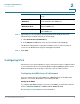

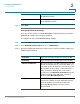
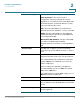

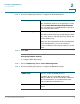
Table Of Contents
- Introduction
- Configuring Networking
- Configuring the Wireless Network
- Configuring the Firewall
- Configuring VPN
- Configuring Quality of Service (QoS)
- Administering Your Cisco RV110W
- Setting Password Complexity
- Configuring User Accounts
- Setting the Session Timeout Value
- Configuring Simple Network Management (SNMP)
- Using Diagnostic Tools
- Configuring Logging
- Configuring Bonjour
- Configuring Date and Time Settings
- Backing Up and Restoring the System
- Upgrading Firmware or Change the Language
- Restarting the Cisco RV110W
- Restoring the Factory Defaults
- Running the Setup Wizard
- Viewing the Cisco RV110W Status
- Using Cisco QuickVPN
- Where to Go From Here
Configuring Networking
Configuring Routing
Cisco RV110W Administration Guide 42
2
To configure static routing:
STEP 1 Choose Networking > Routing.
STEP 2 From the Route Entries drop-down menu, choose a route entry.
To delete the route entry, click Delete This Entry.
STEP 3 Configure the following settings for the selected route entry:
STEP 4 Click Save.
Configuring Inter-VLAN Routing
Check the Inter-VLAN Routing box to enable routing between the separate VLANs
on the Cisco RV110W.
Enter Route Name Enter the name of the route.
Destination LAN IP Enter the IP address of the destination LAN.
Subnet Mask Enter the subnet mask of the destination network.
Gateway Enter the IP address of the gateway used for this
route.
Interface Select the interface to which packets for this route
are sent:
• LAN & Wireless—Click this button to direct packets
to the LAN and wireless network.
• Internet (WAN)—Click this button to direct packets
to the Internet (WAN).