
User Manual
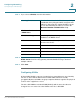
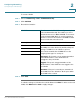

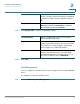

Table Of Contents
- Introduction
- Configuring Networking
- Configuring the Wireless Network
- Configuring the Firewall
- Configuring VPN
- Configuring Quality of Service (QoS)
- Administering Your Cisco RV110W
- Setting Password Complexity
- Configuring User Accounts
- Setting the Session Timeout Value
- Configuring Simple Network Management (SNMP)
- Using Diagnostic Tools
- Configuring Logging
- Configuring Bonjour
- Configuring Date and Time Settings
- Backing Up and Restoring the System
- Upgrading Firmware or Change the Language
- Restarting the Cisco RV110W
- Restoring the Factory Defaults
- Running the Setup Wizard
- Viewing the Cisco RV110W Status
- Using Cisco QuickVPN
- Where to Go From Here
Configuring Networking
Configuring the LAN Settings
Cisco RV110W Administration Guide 36
2
STEP 3 From the VLAN drop-down menu, choose the ID of the VLAN where DMZ is
enabled.
STEP 4 In the Host IP Address field, enter the IP address of the DMZ host. The DMZ host
is the endpoint that receives the redirected packets.
STEP 5 Click Save.
Configuring RSTP
Rapid Spanning Tree Protocol (RSTP) is a network protocol prevents loops in the
network and dynamically reconfigures which physical links should forward frames.
To configure Rapid Spanning Tree Protocol (RTSP):
STEP 1 Choose Networking > LAN > RSTP.
STEP 2 Configure the following settings:
System Priority Choose the system priority from the drop-down
menu. You can choose from a system priority from
0 to 61440 in increments of 4096. Valid values are
0, 4096, 8192, 12288, 16384, 20480, 24576,
28672, 32768, 40960, 45056, 49152, 53248,
57344, and 61440.
The lower the system priority, the more likely the
Cisco RV110W is to become the root in the
spanning tree. The default is 327688.
Hello Time The hello time is the time period that the root of the
spanning tree waits before sending hello
messages. Enter a number from 1 to 10. The default
is 2.
Max Age The max age is the time period that the router waits
to receive a hello message. If the max age is
reached, the router tries to change the spanning
tree. Enter a number from 6 to 40. The default is 20.