
User Manual
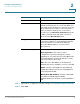
Table Of Contents
- Introduction
- Configuring Networking
- Configuring the Wireless Network
- Configuring the Firewall
- Configuring VPN
- Configuring Quality of Service (QoS)
- Administering Your Cisco RV110W
- Setting Password Complexity
- Configuring User Accounts
- Setting the Session Timeout Value
- Configuring Simple Network Management (SNMP)
- Using Diagnostic Tools
- Configuring Logging
- Configuring Bonjour
- Configuring Date and Time Settings
- Backing Up and Restoring the System
- Upgrading Firmware or Change the Language
- Restarting the Cisco RV110W
- Restoring the Factory Defaults
- Running the Setup Wizard
- Viewing the Cisco RV110W Status
- Using Cisco QuickVPN
- Where to Go From Here

Configuring Networking
Configuring the LAN Settings
Cisco RV110W Administration Guide 29
2
STEP 2 Click Save.
Configuring the LAN Settings
The default DHCP and TCP/IP settings work for most applications. If you want
another PC on your network to be the DHCP server, or if you want to manually
configure the network settings of all of your PCs, disable DHCP.
Also, instead of using a DNS server, which maps Internet domain names (for
example, www.cisco.com) to IP addresses, you can use a Windows Internet
Naming Service (WINS) server. A WINS server is the equivalent of a DNS server
but uses the NetBIOS protocol to resolve hostnames. The Cisco RV110W includes
the IP address of the WINS server in the DHCP configuration the Cisco RV110W
sends to DHCP clients.
NOTE If the Cisco RV110W is connected to a modem or device that has a configured
network on the same subnet (192.168.1.x), the Cisco RV110W automatically
changes the LAN subnet to a random subnet based on 10.x.x.x, so there is no
conflict with the subnet on the WAN side of the Cisco RV110W.
You can assign an IP address to each additional subnet on the Cisco RV110W.
MTU The Maximum Transmit Unit (MTU) is the size of the
largest packet that can be sent over the network.
The standard MTU value for Ethernet networks is
usually 1500 bytes. For PPPoE connections, the
value is 1492 bytes.
Unless a change is required by your ISP, Cisco
recommends that you choose Auto. The default
MTU size is 1500 bytes.
If your ISP requires a custom MTU setting, choose
Manual and enter the MTU size.
Size Enter the MTU size.