
Specifications







Voice Interface Cards
Receive and Transmit (E&M) Interface Cards
7
OL-12847-01
Connecting FXO Cards
Use a straight-through RJ-11 cable to connect the FXO voice interface card to the PSTN or PBX through
a telephone wall outlet.
Note Ports on this interface card are colored pink.
Step 1 Confirm that the router is still turned off.
Caution To comply with the Telcordia GR-1089 NEBS standard for electromagnetic compatibility and safety,
connect the 2-port FXO card (VIC2-2FXO) only to intra-building or non-exposed wiring or cabling. The
intrabuilding cable must be shielded and the shield must be grounded at both ends.
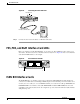
Step 2 Connect one end of the straight-through RJ-11 cable to an RJ-11 port on the card. (See Figure 86.)
Figure 86 Connecting an FXO Card
Step 3 Connect the other end to an RJ-11 telephone wall outlet.
Receive and Transmit (E&M) Interface Cards
RecEive and transMit (E&M) is a signaling technique for two-wire and four-wire telephone and trunk
interfaces. The E&M interface typically connects remote calls from an IP network to a PBX. The cards
are illustrated in Figure 87 and Figure 88.
Caution To comply with the Telcordia GR-1089 NEBS standard for electromagnetic compatibility and safety,
connect the 2-port E&M card (VIC2-2E/M) only to intra-building or non-exposed wiring or cabling. The
intrabuilding cable must be shielded and the shield must be grounded at both ends.
Straight-through
RJ-11-to-RJ-11 cable
RJ-11 ports
RJ-11 wall jack
41195
SEE MANUAL BEFORE INSTALLATION
VIC
FXS
IN USE
IN USE
1
0