
Specifications







Voice Interface Cards
Foreign Exchange Office (FXO) Interface Cards
6
OL-12847-01
Warning
For connections outside the building where the equipment is installed, the following ports must be
connected through an approved network termination unit with integral circuit protection.
FXO
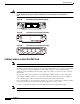
Figure 83 2-Port FXO Card Front Panel (VIC-2FXO)
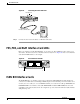
Figure 84 2-Port FXO Card Front Panel (VIC2-2FXO)
Figure 85 4-Port FXO Card Front Panel (VIC2-4FXO)
Setting Jumpers on the 2-Port FXO Card
Note This information does not apply to the VIC2-2FXO card.
The FXO voice interface card includes two jumper headers, W3 and W4, to set loop-start or ground-start
mode. One jumper configures each FXO port. The default setting is loop-start, which should be
satisfactory in most installations. In this setting, jumpers are placed over positions 2 and 3 of headers
W3 and W4.
Most modern central office equipment, such as DMS-100 and 5ESS switches, provides calling party
control (CPC) and Ring on Seize on loop-start lines. CPC allows quicker disconnection, and Ring on
Seize minimizes glare (collision of inbound and outbound calls on the same interface).
If your central office does not provide these features on loop-start, you may want to configure the FXO
card for ground-start operation instead by moving the jumpers to positions 1 and 2.
For proper operation, both jumpers on the VIC-2FXO card must be configured identically.
Note This setting does not apply to VIC-2FXO-EU and VIC-2FXO-M2 interface cards.
41217
SEE MANUAL BEFORE INSTALLATION
VIC
FXO
IN USE
IN USE
1 0
89038
1
89040
VIC2-
4FXO
I
2