
Maintenance Manual

Site Configuration
Monitoring and Notification
55
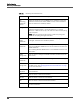
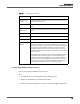
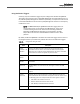
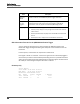
Table 20. SMTP Configuration fields
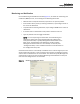
Configuring the SMTP Settings for Email
Use this task to configure SMTP settings for email.
TASK
1. On the Base server, start Configuration Setup (PostInstall.exe).
2. Navigate to the Monitoring and Notification window.
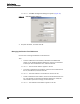
3. Select the Use Email Notification check box, and then click SMTP Configuration.
Field Description
Host Name/IP
Address
Choose Host Name or IP Address, and then enter the hostname or IP
address of the SMTP server.
Port The port used by the MANA service to communicate with the SMTP
server.
Use
Authentication
Select this check box if authentication is needed to access the SMTP
server.
User The username needed to access the SMTP server.
Password The password needed to access the SMTP server.
From Address The email address from which all notification emails will come.
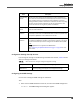
Emergency
Address
The email address to which notification is sent if the Quality
Management database is down when the MANA service attempts to
get its initial configuration. The notification email addresses configured
in the Monitoring and Notification window are stored in the Quality
Management database, and thus will not be functional in the event
that the Quality Management database is unavailable when the MANA
service first starts.
If the MANA service has already obtained a valid configuration from the
Quality Management database, and then the Quality Management
database goes down while the MANA service is running, the MANA
service will use the valid configuration it already has. As a result, the
notification that the Quality Management database is down will go to
the configured email address, not to the emergency address.