
Administrator's Guide



Managing databases 81
This chapter will assist you in understanding how to configure and maintain your Unified WIM and Unified EIM
databases.
Best practices for configuring databases
Installation and settings
Active database
While installing the application, ensure that data and log files of the active database reside on a disk volume
with a good amount of free disk space.
Set the active database properties as follows:
Properties of Datafile: Automatically grow file by 400-700 MB
Maximum file size set to unrestricted file growth
Other databases
Other system databases (master, model, msdb, TEMPDB) should also be installed on a disk volume with a
good amount of free disk space because TEMPDB may sometimes grow due to application requirements.
Care needs to be taken during MSSQL installation that the data files are pointed to other location rather than
the system volume.
Transaction logs
Set the transaction log properties as follows:
Properties of Datafile: Automatically grow file by 10%
Maximum file size set to unrestricted file growth
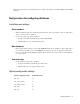
Optimal configuration settings
Database configuration setting Recommended value
auto_close off
auto_create_statistics on
auto_update_statistics on
auto_shrink off
read_only off