
Administrator's Guide





44 Cisco Unified Web and E-Mail Interaction Manager System Administration Guide
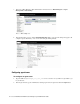
3. In the Cisco IPCC Enterprise Web Administration window, browse to IPCC Enterprise > Agent
Management > Desk Settings.
Browse to Desk Settings node
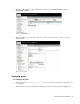
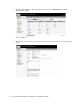
4. In the Desk Settings section, click the DefaultDeskSettings link to view the desk settings that apply to all
configured agents. Alternately, create a new desk setting by clicking Create.
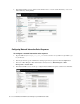
View desk settings details
Configuring agent teams
To configure an agent team:
1. Type the URL
https://
Unified_SCCE_Server_Name
/uiroot/default/ipccAdmin/loginAdmin.jsp
in your browser.
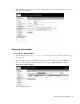
2. In the Login window, type the Administrator desktop login name and password. Click the Login button.