
Administrator's Guide





42 Cisco Unified Web and E-Mail Interaction Manager System Administration Guide
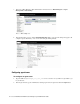
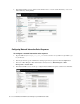
3. In the Cisco IPCC Enterprise Web Administration window, browse to IPCC Enterprise > System
Management > Machine Management > Machines.
Browse to the Machines node
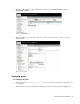
4. In the Machines section, click the machine name of the multichannel controller server. Alternately, click
Create to add a multichannel controller server.
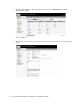
5. In the Describe the IPCC Machine in your deployment window, view or edit the hostname and role of the
machine. Click Next.
View the hostname and role of the machine