
Administrator's Guide





34 Cisco Unified Web and E-Mail Interaction Manager System Administration Guide
4. On the Routing tab, click the Dialed Number button, and click in the script editor. The Dialed Number
(DN) node is added to the script editor.
5. Double-click the DN node to open the DN Properties window.
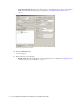
6. In the DN Properties window, on the Dialed Number node, from the list of available script selectors select a
script selector and click the Add button. Click OK.
Select a dialed number
7. On the Targets tab, click the Skill Group button, and click in the script editor. The Skill Group node is
added to the script editor.
8. Double-click the Skill Group node to open the Skill Group Properties window.
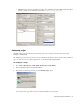
9. In the Skill Group Properties window, on the Routing Target tab, in the Skill Group column, select an IPTA
skill group.
Select an IPTA skill group
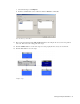
10. Next, On the Targets tab, click the Label button, and click in the script editor. The Label node is added to
the script editor.
11. Double-click the Label node to open the Label window.
12. In the Label window, on the Label tab, set the following: