
Administrator's Guide






22 Cisco Unified Web and E-Mail Interaction Manager System Administration Guide
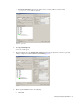
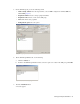
2. In the Configuration Manager window, browse to Tools > List Tools > Agent Desk Settings List.
3. Double-click Agent Desk Settings List.
4. In the Agent Desk Settings List window, in the Select filter data section, click Retrieve. Then, in the Agent
Desk Settings section, click Add.
A new entry is created and the Attributes tab becomes editable.
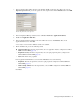
5. On the Attributes tab, in the Name field, provide a name for the agent desk setting group. Click Save.
Provide the name of the agent desk settings group
Configuring agent peripheral gateway (Agent PG)
An Agent PG is required for creating of one or more peripherals that manage agent distribution within Unified
CCE. Configure an Agent PG using the Configuration Manager and then install it on the appropriate machine.
To configure an agent peripheral gateway:
1. Go to Start > All Programs > ICM Admin Workstation > Configuration Manager.
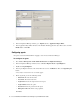
2. In the Configuration Manager window, browse to Tools > Explorer Tools > PG Explorer.
3. Double-click PG Explorer.
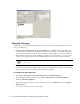
4. In the PG Explorer window, in the Select filter data section, click Retrieve. Then, click [1] Add PG.
5. On the Logical Controller tab, provide the following details:
Name: Provide a name for the agent peripheral gateway.
Client type: Set it to CallManager/SoftACD.
Primary CTI address: Provide the address of the primary CTI server in the format
IP_Address:Port_Number.