
Administrator's Guide






Setting up an integrated installation 15
Configure media routing domains
Configuring Network VRU
A Network VRU is required for supporting incoming voice calls to Unified CCE.
To configure a Network VRU:
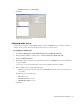
1. Go to Start > All Programs > ICM Admin Workstation > Configuration Manager.
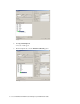
2. In the Configuration Manager window, browse to Tools > Explorer Tools > Network VRU Explorer.
3. Double-click Network VRU Explorer.
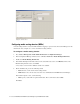
4. In the Network VRU window, in the Select filter data section, click Retrieve. Then, click [1] Add Network
VRU.
A new entry is created and a new set of tabs appear.
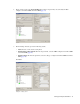
5. On the Network VRU tab, provide the following details:
Name: Provide a name for the network VRU.
Type: Set it to Type 2.
Click Save.