
Administrator's Guide






Setting up an integrated installation 13
Permission level: Set it to Read only.
Click Save.
Configure the application instance
Configuring media classes
A media class is required for creating MRDs. It helps categorize the MRDs based on media type (email, for
example). Create a media class for email. The media class for voice already exists.
To configure a media class:
1. Go to Start > All Programs > ICM Admin Workstation > Configuration Manager.
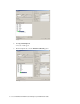
2. In the Configuration Manager window, browse to Tools > List Tools > Media Class List.
3. Double-click Media Class List.
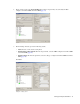
4. In the Media Class List window, in the Select filter data section, click Retrieve. Then, in the Media Class
section, click Add.
A new entry is created in the Media Class section and the Attributes tab becomes editable.
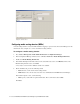
5. On the Attributes tab, provide the following details:
Name: Provide the name for the media class as CIM_EIM. Note that the names of media classes are
case sensitive.
In the Task section, set the following:
Life: 300 seconds
Start timeout: 10000 seconds
Max Duration: 28800 seconds
Click Save.