
Release Notes


8
Release Notes for Cisco TelePresence System Software Release 1.10
What’s New
New in Release 1.10.5
This release resolves system issues and enhances the user experience. There are no new features
associated with this release.
See the “Caveats in Cisco TelePresence System Software Release 1.10.5” section on page 41 for a
complete list of caveats.
New in Release 1.10.4
This release resolves system issues and enhances the user experience. There are no new features
associated with this release.
See the “Caveats in Cisco TelePresence System Software Release 1.10.4” section on page 42 for a
complete list of caveats.
Caveat for Microsoft Lync 2013
Because systems running CTS software can decode a maximum of 30 frames per second (fps), and Lync
clients intermittently exceed transmission rates of 30 fps, video conferences with a Lync client can have
unacceptable quality. For better video quality, use a Cisco TelePresence server between the Lync client
and Cisco TelePresence system.
New in Release 1.10.3
This release resolves system issues and enhances the user experience. There are no new features
associated with this release.
See the “Caveats in Cisco TelePresence System Software Release 1.10.3” section on page 45 for a
complete list of caveats.
New in Release 1.10.2
The following feature is new in this release:
TelePresence Management Suite (TMS) Integration
Note This feature requires TMS version 14.3 or later and requires the use of a Touch 12 device as your call
control device. Systems that use a Cisco Unified IP Phone for call control cannot use this feature.
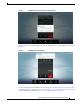
This software release enhances the use of TMS as a call scheduling and management platform. If your
system uses TMS, some new messages appear on your Touch 12 device. For example, if you are the
video conference master (VC master) of your meeting, a prompt appears a few minutes before your
meeting ends that gives you the option to extend your meeting. See Figure 1 for an example of this
prompt.