
Release Notes




8
Release Notes for Cisco SocialMiner Release 8.5(4) October 17, 2011
New and Changed Features
Script Filter
SocialMiner 8.5(4) introduces the script filter as a developer’s feature. A script filter is custom code that
system developers can create in the Groovy Scripting language. A script filter can apply tags, can change
content, and can integrate with external systems to leverage services such as performing translation or
invoking a Klout score for a social contact retrieved from a Twitter Account feed. There are examples
of script filters in the SocialMiner 8.5(4) Developers Guide and on the Cisco Developer Network (CDN).
You can upload multiple Groovy scripts and attach ea
ch to a SocialMiner Script Filter.
During the upload, SocialMiner performs a basic syntacti
c validation but cannot validate that the script
will work as expected. For this reason, test your scripts on a lab system before using them in production.
SocialMiner runs scripts in Groovy 1.8.
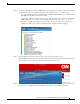
Scripts errors are visible when you hover the cursor over the filter icons on the Filters gadget. You can
also open the R
untime Error logs in the Log Directory to view the list of security breaches. Under the
directory named runtime/, open the Error-runtime log and search for SCRIPT_FILTER_EXCEPTION.
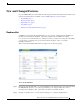
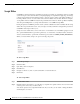
When you create a filter, Script is an option on the Type dropdown.
To add a script filter:
Step 1 Select the type Script
Step 2 Name the filter,
Step 3 Optionally, enter a description,
Step 4 Click Browse.
Step 5 Navigate to the Groovy file on your local machine or network. Select it.
Step 6 Click Save.
To edit a Script Filter:
Step 1 Click the filter's name.
Step 2 Click the Show Source button to open the Groovy script file in a separate window. You can review and
select/copy the source, but you cannot edit it.
You can also upload a new script file in Edit mode. If you do this, you can retain or change the Name
an
d Description, as needed.