
Release Notes





12
Release Notes for Cisco SocialMiner Release 8.5(4) October 17, 2011
Open and Resolved Caveats in This Release
Using Bug Toolkit
If you have an account with Cisco.com, you can use the Bug Toolkit to find caveats of any severity for
any release.
Bug Toolkit is an online tool that is available for customers to query defects according to their own
needs.
To access Bug Toolkit, you need the following items:
• Internet connection
• Web browser
• Cisco.com user ID and password
Procedure
Step 1 To access the Bug Toolkit, go to
http://www.cisco.com/cgi-bin/Support/Bugtool/launch_bugtool.pl
Step 2 Log on with your Cisco.com user ID and password.
Step 3 Click the Launch Bug Toolkit hyperlink.
Step 4 If you are looking for information about a specific caveat, enter the ID number in the “Enter known bug
ID:” field.
To view all caveats for Cisco SocialMiner, go to the “Search for bugs in other Cisco software and
hardware products” section, and enter Cisco SocialMiner in the Product Name field.
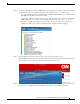
Step 5 Click Next. The Cisco SocialMiner search window displays.
Step 6 Choose the filters to query for caveats. You can choose any or all of the available options:
a. Select the Cisco SocialMiner Version:
• Choose the major version for the major releases.
A major release contains significant new features, enhancements, architectural changes, and/or
defect fixes.
• Choose the revision for more specific information.
A revision release primarily contains defect fixes to address specific problems, but it may also
include new features and/or enhancements.
b. Choose the Features or Components to query; make your selection from the “Available” list and
click Add to place your selection in the “Limit search to” list.
To query for all caveats for a specified release, choose “All Features” in the left window pane.
Note The default value specifies “All Features” and includes all of the items in the left window pane.
c. Enter keywords to search for a caveat title and description, if desired.
Note To make queries less specific, use the All wildcard for the major version/revision,
features/components, and keyword options.
d. Choose the Set Advanced Options, including the following items:
• Bug Severity level—The default specifies 1-3.