
Troubleshooting Guide
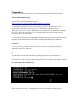

/p e r f i g o / c o m m o n/ b i n/ f o s t a t e . s h
2 . L og into the Active NAC M anager interface w ith a standard w eb brow ser.
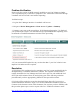
3 . Navigate to D e v i c e M a na g e m e nt > C C A S e r v e r s
4. V erify management connectivity of all NAC S ervers from the NAC M anager U I by
click ing on the ‘ M anage’ button listed nex t to each of the listed NAC S ervers.
.
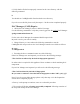
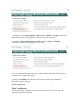
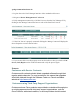
5 . I f the NAC S erver is properly connected click ing the ‘ M anage’ button w ill display the
S erver P roperties screen as show n below :
6. I f you are not able to see the property screen as show n above, then go to back to N A C
S e r v e r ( C A S ) R e p a i r section of this document and verify the process again
Footnote
Customers with Service Contracts
Customers with contracts should obtain upgraded software through their
regular update channels. F or most customers, this means that upgrades
should be obtained through the S oftware Center on Cisco' s worldwide
website at http: / / www.cisco.com.
Customers using T hird P arty Sup p ort O rg aniz ations
Customers whose Cisco products are prov ided or maintained through prior
or ex isting agreements with third-party support organiz ations, such as
Cisco P artners, authoriz ed resellers, or serv ice prov iders should contact