
Troubleshooting Guide
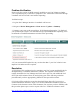
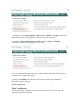
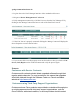

7 . Navigate to D evice M a na g e m e nt > C l e a n A c c e s s > U p d a t e s > U p d a t e . Click on the
update button to get the latest update. T his may tak e up to 10 minutes.
8 . Navigate to D e v i c e M a na g e m e nt > C l e a n A c c e s s > U p d a t e s > S u m m a r y
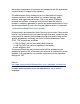
Confirm the O S D etection F ingerprint id is set to 8.
9 . I f your current O S D F update lists any version other than 8 please verify all previous
steps have been completed properly.
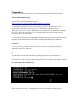
10 . S S H to the S t a nd b y NAC M anager and ex ecute the follow ing command to
reinitializ e the NAC M anager:
s e r v i c e p e r f i g o s t a r t
F inal V erif ic at io n
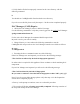
1.V erify that all NAC Appliances are in their ex pected H A state. S S H to each and
ex ecute the follow ing command: