
Troubleshooting Guide

4. R epeat steps 1-4 for each NAC S erver pair in the environment.
F inal S t eps :
Note: F or a S tandalone NAC M anager setup, proceed directly to step 3
1. S S H to the S tandby NAC M anager.
U se the follow ing command to verify that you are logged into the S tandby NAC
M anager:
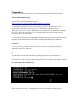
/ p e r f i g o / c o m m o n/ b i n/ f o s t a t e . s h
T he command should respond w ith:
M y node is standby, peer node is active
2 . E x ecute the s e r v i c e p e r f i g o s t o p command
3 . S S H to the active NAC M anager and use the follow ing command to verify the standby
peer is dead.
/ p e r f i g o / c o m m o n/ b i n/ f o s t a t e . s h
T he command should respond w ith:
M y node is active, peer node is dead
4. R estart the active NAC M anager by issuing the follow ing command:
s e r v i c e p e r f i g o r e b o o t
W ait 5 to 10 minutes for the NAC M anager to complete the boot cycle.
5 . L og into the Active NAC M anager interface w ith a standard w eb brow ser.
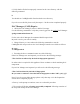
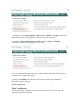
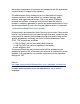
6. Navigate to D e v i c e M a na g e m e nt > C l e a n A c c e s s > U p d a t e s > S u m m a r y
T he O S D etection F ingerprint version should show 6 as below :