
Specifications


Configuring Cisco Unified SIP SRST Features Using Back-to-Back User Agent Mode (for Version 3.4 and Version 4.0
How to Configure Cisco Unified SIP SRST
56
Cisco Unified SIP SRST 4.0 System Administrator Guide
When a user attempts to place a call to digits that match a pattern that has been specified for call blocking
during a time period that has been defined for call blocking, the call is immediately terminated and the
caller hears a fast busy.
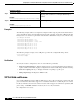
In SRST (call-manager-fallback configuration mode), there is no phone- or pin-based exemption to
after-hours call blocking. However, in Cisco Unified SIP SRST (voice register pool mode), individual IP
phones can be exempted from all call blocking using the after-hours exempt command.
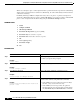
SUMMARY STEPS
1. enable
2. configure terminal
3. call-manager-fallback
4. after-hours block pattern tag pattern [7-24]
5. after-hours day day start-time stop-time
6. after-hours date month date start-time stop-time
7. exit
8. voice register pool tag
9. after-hour exempt
10. end
DETAILED STEPS
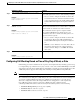
Command or Action Purpose
Step 1
enable
Example:
Router> enable
Enables privileged EXEC mode.
• Enter your password if prompted.
Step 2
configure terminal
Example:
Router# configure terminal
Enters global configuration mode.
Step 3
call-manager-fallback
Example:
Router(config)# call-manager-fallback
Enters call-manager-fallback configuration mode.
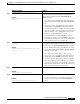
Step 4
after-hours block pattern
tag
pattern
[7-24]
Example:
Router(config-cm-fallback)# after-hours block
pattern 1 91900
Defines a pattern of outgoing digits to be blocked. Up to 32
patterns can be defined, using individual commands.
• If the 7-24 keyword is specified, the pattern is always
blocked, 7 days a week, 24 hours a day.
• If the 7-24 keyword is not specified, the pattern is
blocked during the days and dates that are defined using
the after-hours day and after-hours date commands.