
Specifications

Configuring Cisco Unified SIP SRST Features Using Back-to-Back User Agent Mode (for Version 3.4 and Version 4.0
How to Configure Cisco Unified SIP SRST
54
Cisco Unified SIP SRST 4.0 System Administrator Guide
SUMMARY STEPS
1. enable
2. configure terminal
3. voice register pool tag
4. call-forward b2bua all directory-number
5. call-forward b2bua busy directory-number
6. call-forward b2bua mailbox directory-number
7. call-forward b2bua noan directory-number timeout seconds
8. end
DETAILED STEPS
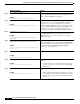
Command or Action Purpose
Step 1
enable
Example:
Router> enable
Enables privileged EXEC mode.
• Enter your password if prompted.
Step 2
configure terminal
Example:
Router# configure terminal
Enters global configuration mode.
Step 3
voice register pool
tag
Example:
Router(config)# voice register pool 15
Enters voice register pool configuration mode.
• Use this command to control which phone registrations
are accepted or rejected by a Cisco Unified SIP SRST
device.
Step 4
call-forward b2bua all
directory-number
Example:
Router(config-register-pool)# call-forward
b2bua all 5005
Enables call forwarding for a SIP back-to-back user agent
(B2BUA) so that all incoming calls are forwarded to
another extension:
• directory-number—Telephone number to which calls
are forwarded. Represents a fully qualified E.164
number. Maximum length of the telephone number is
32.
Step 5
call-forward b2bua busy
directory-number
Example:
Router(config-register-pool)# call-forward
b2bua busy 5006
Enables call forwarding for a SIP B2BUA so that incoming
calls to a busy extension are forwarded to another extension.
• directory-number—Telephone number to which calls
are forwarded. Represents a fully qualified E.164
number. Maximum length of the telephone number is
32.