
Specifications
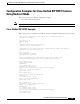


Configuring Cisco Unified SIP SRST Features Using Back-to-Back User Agent Mode (for Version 3.4 and Version 4.0
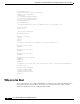
How to Configure Cisco Unified SIP SRST
53
Cisco Unified SIP SRST 4.0 System Administrator Guide
Configuring SIP-to-SIP Call Forwarding
SIP-to-SIP call forwarding (call routing) is available. Call forwarding is provided either by the phone or
by using a back-to-back user agent (B2BUA), which allows call forwarding on any dial peer. Calls into
a SIP device may be forwarded to other SIP or SCCP devices (including Cisco Unity, third-party
voice-mail systems, or an auto attendant or IVR system such as IPCC and IPCC Express). In addition,
SCCP IP phones may be forwarded to SIP phones.
Cisco Unity or other voice messaging systems connected by a SIP trunk or SIP user agent are able to
pass a message-waiting indicator (MWI) when a message is left. The SIP phone then displays the MWI
when indicated by the voice messaging system.
Note SIP-to-H.323 call forwarding is not supported.
To configure SIP-to-SIP call forwarding, you must first allow connections between specific types of
endpoints in a Cisco IP-to-IP gateway. The allow-connections command grants this capability. For more
information on setting the allow-connections command, see the “Enabling SIP-to-SIP Connection
Capabilities” section on page 21. Once the SIP-to-SIP connections are allowed, you can configure call
forwarding under an individual SIP phone pool. Any of the following commands can be used to
configure call forwarding, according to your needs:
• Under voice register pool
–
call-forward b2bua all directory-number
–
call-forward b2bua busy directory-number
–
call-forward b2bua mailbox directory-number
–
call-forward b2bua noan directory-number [timeout seconds]
In a typical Cisco Unified SIP SRST setup, the call-forward b2bua mailbox command is not used;
however it is likely to be used in a Cisco Unified SIP CallManager Express (CME) environment.
Detailed procedures for configuring the call-forward b2bua mailbox command are found in
Cisco CallManager Express Version 3.4 documentation.
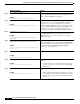
Step 10
codec
codec-type
[
bytes
]
Example:
Router(config-register-pool)# codec g729r8
Specifies the codec supported by a single SIP phone or a
VoIP dial peer in a Cisco Unified SIP SRST environment.
The codec-type argument specifies the preferred codec and
can be one of the following:
• g711alaw—G.711 a–law 64,000 bps.
• g711ulaw—G.711 mu–law 64,000 bps.
• g729r8—G.729 8000 bps (default).
The bytes argument is optional and specifies the number of
bytes in the voice payload of each frame
Step 11
end
Example:
Router(config-register-pool)# end
Returns to privileged EXEC mode.
Command or Action Purpose