
Specifications


Configuring Cisco Unified SIP SRST Features Using Redirect Mode (for Version 3.0 Only)
How to Configure Cisco Unified SIP SRST Features Using Redirect Mode
43
Cisco Unified SIP SRST 4.0 System Administrator Guide
DETAILED STEPS
Configuring Sending 300 Multiple Choice Support
Prior to Cisco IOS Release 12.2(15)ZJ, when a call was redirected, the SIP gateway would send a 302
Moved Temporarily message. The first longest match route on a gateway (dial-peer destination pattern)
was used in the Contact header of the 302 message. With Release 12.2(15)ZJ, if multiple routes to a
destination exist for a redirected number (multiple dial peers are matched), the SIP gateway sends a 300
Multiple Choice message, and the multiple routes in the Contact header are listed.
The configuration below allows users to choose the order in which the routes appear in the Contact
header.
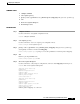
Command or Action Purpose
Step 1
enable
Example:
Router> enable
Enables privileged EXEC mode.
• Enter your password if prompted.
Step 2
configure terminal
Example:
Router# configure terminal
Enters global configuration mode.
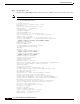
Step 3
dial-peer voice
tag
voip
Example:
Router(config)# dial-peer voice 25 voip
Enters dial-peer configuration mode.
• tag—A number that uniquely identifies the dial peer
(this number has local significance only).
• voip—Indicates that this is a VoIP peer using voice
encapsulation on the POTS network and is used for
configuring redirect.
Step 4
application
application-name
Example:
Router(config-dial-peer)# application session
Enables a specific application on a dial peer.
• For SIP, the default Tool Command Language (Tcl)
application (from the Cisco IOS image) is session and
can be applied to both VoIP and POTS dial peers.
• The application must support IP-to-IP redirection.
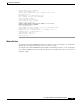
Step 5
redirect ip2ip
Example:
Router(config-dial-peer)# redirect ip2ip
Redirects SIP phone calls to SIP phone calls on a specific
VoIP dial peer using the Cisco IOS voice gateway.
Step 6
end
Example:
Router(config-dial-peer)# end
Returns to privileged EXEC mode.