
Specifications


Configuring the SIP Registrar
How to Configure the SIP Registrar
37
Cisco Unified SIP SRST 4.0 System Administrator Guide
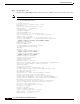
Playout Mode is set to adaptive,
Initial 60 ms, Max 300 ms
Playout-delay Minimum mode is set to default, value 40 ms
Fax nominal 300 ms
Max Redirects = 1, signaling-type = cas,
VAD = enabled, Poor QOV Trap = disabled,
Source Interface = NONE
voice class sip url = system,
voice class sip rel1xx = system,
redirect ip2ip = enabled
monitor probe method: icmp-ping ip address: 10.2.161.187,
Monitored destination reachable
voice class perm tag = `'
Time elapsed since last clearing of voice call statistics never
Connect Time = 0, Charged Units = 0,
Successful Calls = 0, Failed Calls = 0, Incomplete Calls = 0
Accepted Calls = 0, Refused Calls = 0,
Last Disconnect Cause is "",
Last Disconnect Text is "",
Last Setup Time = 0.
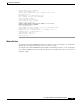
What to Do Next
To configure Cisco Unified SIP SRST redirect mode, features see the “Configuring Cisco Unified SIP
SRST Features Using Redirect Mode (for Version 3.0 Only)” chapter.
To configure Cisco Unified SIP SRST call forwarding and call blocking features, see the “Configuring
Cisco Unified SIP SRST Features Using Back-to-Back User Agent Mode (for Version 3.4 and Version
4.0 Only)” chapter.