
Specifications


Configuring the SIP Registrar
How to Configure the SIP Registrar
35
Cisco Unified SIP SRST 4.0 System Administrator Guide
SUMMARY STEPS
1. configure terminal
2. voice register pool tag
3. proxy ip-address [preference value] [monitor probe {icmp-ping | rtr} [alternate-ip-address]]
4. end
5. show voice register dial-peers
6. show dial-peer voice
DETAILED STEPS
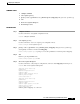
Step 1 configure terminal
Use this command to enter global configuration mode.
Router# configure terminal
Step 2 voice register pool tag
Use this command to enter voice register pool configuration mode.
Router(config)# voice register pool 1
Step 3 proxy ip-address [preference value] [monitor probe {icmp-ping | rtr} [alternate-ip-address]]
Set the proxy command to monitor with icmp-ping:
Router(config-register-pool)# proxy 10.2.161.187 preference 1 monitor probe icmp-ping
Step 4 end
Returns to privileged EXEC mode.
Router(config-register-pool)# end
Step 5 show voice register dial-peers
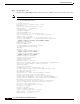
Use this command to verify dial-peer configurations, and notice that icmp-ping monitoring is set.
Router# show voice register dial-peers
dial-peer voice 40035 voip
preference 5
destination-pattern 91011
redirect ip2ip
session target ipv4:192.168.0.2
session protocol sipv2
voice-class codec 1
dial-peer voice 40036 voip
preference 1
destination-pattern 91011
redirect ip2ip
session target ipv4:10.2.161.187
session protocol sipv2
voice-class codec 1
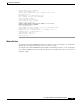
monitor probe icmp-ping 10.2.161.187