
Specifications





Configuring the SIP Registrar
How to Configure the SIP Registrar
28
Cisco Unified SIP SRST 4.0 System Administrator Guide
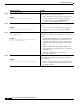
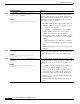
Step 3
call fallback active
Example:
Router(config)# call fallback active
(Optional) Enables a call request to fall back to alternate
dial peers in case of network congestion.
• This command is used if you want to monitor the proxy
dial peer and fallback to the next preferred dial peer.
For full information on the call fallback active
command, see the PSTN Fallback Feature.
Step 4
voice register pool
tag
Example:
Router(config)# voice register pool 12
Enters voice register pool configuration mode for SIP
phones.
• Use this command to control which registrations are
accepted or rejected by a Cisco Unified SIP SRST
device.
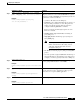
Step 5
id {network
address
mask
mask
| ip
address
mask
mask
| mac
address
}
Example:
Router(config-register-pool)# id network
172.16.0.0 mask 255.255.0.0
Explicitly identifies a locally available individual or set of
SIP IP phones. The keywords and arguments are defined as
follows:
• network address mask mask: The network address
mask mask keyword/argument combination is used to
accept SIP Register messages for the indicated phone
numbers from any IP phone within the indicated IP
subnet.
• ip address mask mask: The ip address mask mask
keyword/argument combination is used to identify an
individual phone.
• mac address: MAC address of a particular
Cisco Unified IP Phone.
Step 6
preference
preference-order
Example:
Router(config-register-pool)# preference 2
Sets the preference order for the VoIP dial peers to be
created. Range is from 0 to 10. Default is 0, which is the
highest preference.
• The preference must be greater (lower priority) than the
preference configured with the preference keyword in
the proxy command.
Command or Action Purpose