
Specifications


5-174 Cisco 7000 Hardware Installation and Maintenance
Installing and Configuring Processor Modules
Software Configuration Register Settings
Settings for the 16-bit software configuration register are written into the NVRAM. Following are
some reasons for changing the software configuration register settings:
• Set and display the configuration register value
• Force the system into the bootstrap program
• Select a boot source and default boot filename
• Enable or disable the Break function
• Control broadcast addresses
• Set the console terminal baud rate
• Load operating software from ROM
• Enable booting from a Trivial File Transfer Protocol (TFTP) server
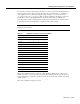
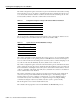
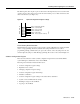
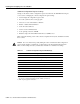
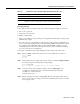
Table 5-4 lists the meaning of each of the software configuration memory bits, and Table 5-5 defines
the boot field.
Caution To avoid confusion and possibly halting the router, remember that valid configuration
register settings might be combinations of settings and not just the individual settings listed in
Table 5-4. For example, the factory default value of 0x0101 is a combination of settings.
Table 5-4 Software Configuration Register Bit Meanings
Bit No.
1
1. The factory default value for the configuration register is 0x0101. This value is a combination of the
following: bit 8 = 0x0100 and bits 00 through 03 = 0x0001 (see Table 5-5).
Hexadecimal Meaning
00 to 03 0x0000 to 0x000F Boot field (see Table 5-5)
06 0x0040 Causes system software to ignore NVRAM contents
07 0x0080 OEM bit enabled
2
2. OEM = Original equipment manufacturer.
08 0x0100 Break disabled
09 0x0200 Use secondary bootstrap
10 0x0400 Internet Protocol (IP) broadcast with all zeros
11 to 12 0x0800 to 0x1000 Console line speed (default is 9,600 baud)
13 0x2000 Boot default ROM software if network boot fails
14 0x4000 IP broadcasts do not have network numbers
15 0x8000 Enable diagnostic messages and ignore NVRAM contents