
User guide






Send comments to n5kdocs@cisco.com
3-8
Cisco Nexus 5000 Series Hardware Installation Guide
OL-15902-01
Chapter 3 Installing the Cisco Nexus 5500 Platform or 5000 Series Switch
Installing the Cisco Nexus 5020 Chassis in a Cabinet or Rack
To install the switch in a cabinet or rack using the rack-mount kit provided with the switch, follow these
steps:
Step 1 Install the front rack-mount brackets as follows:
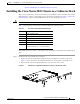
a. Position a front rack-mount bracket against the chassis and align the screw holes as shown in
Figure 3-3. Then attach the front rack-mount bracket to the chassis with six of the M4 screws.
b. Repeat with the other front rack-mount bracket on the other side of the switch.
Figure 3-3 Attaching Front Rack-Mount Bracket to the Cisco Nexus 5020 switch
Step 2 Install the rack-mount guides on the switch as follows:
a. Position one of the rack-mount brackets against the side of the switch and align the screw holes as
shown in
Figure 3-3. Then attach the bracket to the switch with two of the flat-head M4 screws.
b. Repeat with the other rack-mount bracket on the other side of the switch.
Ta b l e 3-2 Cisco Nexus 5020 Switch Rack-Mount Kit
Quantity Part Description
2 Rack-mount brackets
16 M4x0.7 x 8-mm Phillips countersunk screws
2 Rack-mount guides
12 10-32 Rack Nuts
12 10-32 x 3/4-inch Phillips countersunk screws
2 Slider rails
(22 inch minimum to a 36 inch maximum)
2 3
1
186363
1 Front rack-mount bracket 3 Slider rail
2 Rack-mount guides