
User guide






Send documentation comments to nx5000-docfeedback@cisco.com
1-9
Cisco Nexus 5000 Series Hardware Installation Guide
OL-15902-01
Chapter 1 Cisco Nexus 5500 Platform Overview
Cisco Nexus 5548P Switch
Power Supplies
The Cisco Nexus 5548 switch uses a front-end power supply. The chassis has slots for two power
supplies. Two power supplies can be used for redundancy, but the Cisco Nexus 5548 switch is fully
functional with one power supply.
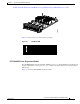
Figure 1-10 shows the power supply, which has two LEDs: one for
power status and one for failure condition.
Figure 1-10 Power Supply for the Cisco Nexus 5548 Switch
Table 1-1 table lists the LED descriptions for the two power supplies.
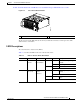
If you have one power supply is installed in the chassis, but the other power supply slot is empty,you
should use a blank fller panel to cover the empty slot. See
Figure 1-11
1 Amber fail LED indicates a failure condition. 2 Green power LED indicates the power status.
236710
Ta b l e 1-1 Power Supply LED Descriptions
Power Supply Condition Power LED Status Fail LED Status
No AC power to all power supplies. Off Off
Power supply failure, including overvoltage, overcurrent,
overtemperature, and fan failure.
Off On
Power supply warning events where the power supply
continues to operate. These events include high
temperature, high power, and slow fan.
Off Blinking
AC present, 3.3 voltage standby (VSB) on, and the power
supply unit is off.
Blinking Off
Power supply on and OK. On Off