
User guide







Send documentation comments to nexus5kdocs@cisco.com
4-10
Cisco Nexus 5000 Series Hardware Installation Guide
OL-15902-01
Chapter 4 Connecting the Switch
Connecting to a Fibre Channel Port
Removing and Installing Cables into SFP Transceivers
Caution To prevent damage to the fiber-optic cables, do not place more tension on them than the rated limit and
do not bend to a radius of less than 1 inch if there is no tension in the cable, or 2 inches if there is tension
in the cable.
This section includes the following topics:
• Installing a Cable into an SFP Transceiver, page 4-10
• Removing a Cable from an SFP Transceiver, page 4-11
Installing a Cable into an SFP Transceiver
Caution To prevent possible damage to the cable or transceiver, install the transceiver in the port before installing
the cable in the transceiver.
To install a cable into a transceiver, follow these steps:
Step 1 Attach an ESD-preventive wrist strap and follow its instructions for use.
Step 2 Remove the dust cover from the connector on the cable.
Step 3 Remove the dust cover from the cable end of the transceiver.
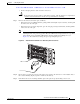
Step 4 Align the cable connector with the transceiver and insert the connector into the transceiver until it clicks
into place. (See
Figure 4-4).
Figure 4-4 Connecting the LC-Type Cable to a Fibre Channel Port
Caution If the cable does not install easily, ensure that it is correctly positioned before continuing.
LC plug
SFP module
91681