
Network Router User Manual
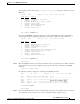
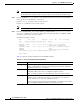
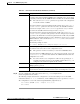
Table Of Contents
- Cisco WAN Manager Operations
- Saving and Restoring Configurations
- Downloading Software and Firmware
- Deleting Images

10-8
Cisco WAN Manager User’s Guide
Release 15, Part Number OL-4552-01 Rev. C0, January 27, 2005
Chapter 10 Cisco WAN Manager Operations
Saving and Restoring Configurations
Note The two prerequisites for Cisco BPX and Cisco IGX nodes are that Configuration Save and
Restore function is enabled, and the temporary memory is not used by the firmware image.
Step 8 Enter the getfwrev <card_type> 0.0 <node> command on the node to remove the loaded firmware
image. Specify 0.0 as the firmware revision level.
Replace <
card_type> with the card to load the revision.
Replace <
node> with the node to load the revision.
Note Before using the savecnf command, you must clean up the loaded firmware images.
Step 9 Enter the savecnf [backup_id | clear] [nodename | *] [CWM_nodename | *] <destination IP> <T>
<
pathname> command to save the node configuration and to upload the files to a CWM or a TFTP
network server where they are stored on disk.
The following example is shown:
bpx1 TN Cisco BPX 8620 9.3.h1 Mar. 9 2001 15:16 GMT
Node Backup ID Revision Date/Time (GMT) Status
-------- --------- -------- ----------------- ---------------------------------
nmsbpx14 C051598 9.3.h1 03/08/01 23:32:16 Saving on SV+ at nmsbpx14
nmssigx28 Reserved for firmware image
nmssigx27 C051598 9.3.h1 03/08/01 23:32:16 Save on SV+ at nmssigx27 complete
nmsbpx13 Clear
nmsbpx12 Save/Restore feature unavailable
Last Command: savecnf C051598 nmsbpx14 nmsbpx14 172.29.23.25
Next Command:
Table 10-1 lists the parameter definitions for the savecnf command.
Table 10-1 savecnf Command Parameter Definitions
Name Description
backup ID Specifies the partial name to identify the configuration file to be saved. The name
must be 1-8 alphanumeric characters, and the first character must be alphabetic.
Configuration names are case-sensitive.
clear Specifies an optional parameter that clears the buffer space in RAM of any old
configuration files before the new configuration snapshot is taken.
Note You must explicitly clear the buffer before it is loaded with a new file.
nodename Specifies the name of the node that needs to have the configuration saved. The
wildcard option, specified by an asterisk (*), is used in place of nodename to
indicate all nodes are to have their configuration saved.
A directory with the name /usr/users/svplus/<backup_id>_Cfgdir is created under
/usr/users/svplus/ConfigData/<backup_id>_Nodename directory.