
Network Router User Manual

7-8
Cisco VPN Solutions Center: MPLS Solution User Guide
78-10548-02
Chapter 7 MPLS VPN Solution Troubleshooting Guide
Provisioning Problems
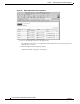
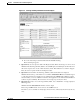
Figure 7-3 All VPN Service Request Report
d.
Select the Invalid service request.
e. From the Provisioning drop-down menu, choose Deploy VPN Service.
f. If you have multiple Invalid requests, then either repeat this procedure for all service requests
or choose Provisioning > Deploy Service Requests.
g. Be sure to click the Deploy selected service requests radio button.
10. Question: My service request is in the Failed Deploy state. How should I address the problem?
Answer: Failed Deploy indicates that there is an error while downloading the changed configlets
back to the router (refer to Table 7-1 on page 7-1 for more information).
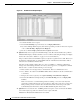
The procedure described for an Invalid request (see Question 8) pertains here as well. However, in
the Task Logs Summary table, look at the PE-Download or CE-Download information. That is
where the error is. Take the link from there.
The cause of the problem could be either one of two possibilities: 1) while the configuration
changes were downloading, the link to the router(s) was dropped or 2) a configuration command
that was sent to a router invoked a warning or error message.
a. First, read the error message and try to understand it. Was it a communication error?
b. If so, Telnet to the router from the MPLS VPN Solution workstation. Get the communication
to work first.
c. Redeploy the service request by choosing Provisioning > List All Service Requests.
d. From the All VPN Service Requests Report, click Provisioning, and choose Deploy VPN
Services.
If the error was due to a command that generated a warning or error, the router may have
rejected the command because the version of the Cisco IOS on the router does not support it.
If the problem persists, contact the Cisco Technical Assistance Center and provide a) the
Command Rejected information, and b) the show version output from the router.
11. Question: I’ve received the error “CORBA generated exception.” Now even if I start the CNGS
Server and redeploy, I get this error and the service request is Invalid.
Answer: It is likely that the CNGS Server has crashed.