
Network Router User Manual

7-5
Cisco VPN Solutions Center: MPLS Solution User Guide
78-10548-02
Chapter 7 MPLS VPN Solution Troubleshooting Guide
Provisioning Problems
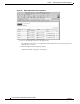
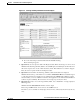
Figure 7-2 Task Log Summary Information and Action Report
d. To see the Action Report, click the link under the Actions heading.
The Action Report appears.
3. Question: My service request is stuck in the Requested state. Where should I go to look for errors?
Answer: In the Task Log Summary Table, look at the PE-UpLoad and CE-UpLoad information for
that service request. One or both of them should say “Fail.” This makes the rest of them “skipped.”
Thus, the service request remains in the Requested state.
4. Question: I tried the link to the Task Log Summary table, but the table isn’t displayed.
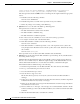
Answer: Check at the top of the frame for a set of links: Stdout/Stderr Errors. Stdout/Stderr gives
you the messages that were displayed to the terminal when the VPIMDownLoadClient program
runs. From this, you can see whether and how the client application ran. All abnormal terminations
would be reported. Similarly, Errors lists the error messages reported by the client.
5. Question: When I try to access the Log Summary Table, I see a “Fatal Error” message displayed.
What happened?
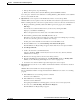
Answer: Click the Stdout/Stderr link and view the output.
First, being a CORBA client, did it connect to the CORBA server?
If it did not, you see a number for “Retrying Connection” lines, followed by these lines (at the very
end):