
Network Router User Manual

7-3
Cisco VPN Solutions Center: MPLS Solution User Guide
78-10548-02
Chapter 7 MPLS VPN Solution Troubleshooting Guide
Provisioning Problems
Provisioning Problems
The MPLS VPN Solution provisioning system has the following functions:
1. Collect the PE router configuration files (PE-upload)
2. Collect the CE router configuration files (CE-upload)
3. Provisioning
4. Write the changed configuration information to the PE (PE-DownLoad)
5. Write the changed configuration information to the CE (CE-DownLoad)
Functions 1, 2, 4, and 5 are executed by a server called the Download to IPM (DIPM) server. For more
information on the DIPM Server, see “The Download to IPM (DIPM) Server” section on page A-1.
Errors in functions 1 or 2 lead to functions 3, 4, and 5 being skipped. The two servers involved in
provisioning are CVPIM Server and CNGS Server. These are CORBA servers.
The provisioning engine has a model of the router. This router model is modified as necessary to
introduce attributes to support the service request.
1. Question: What is the flow of the provisioning operation?
Answer:
The program that runs all these functions is called VPIMDownLoadClient. VPIM DownLoad Client
is a client to the CVPIM server. VPIM DownLoad Client initializes the provisioning by making a
CORBA call to the CVPIM server.
The CVPIM server calls the DIPM server to perform functions 1 and 2. After the product uploads
the fresh configuration files from the router, it provisions the service request and calls the CNGS
server for the changes.
After a successful operation to update the configlet with the necessary changes, the CVPIM server
calls the DIPM server to download the new configlets to the routers (that is, functions 4 and 5).
If functions 1 or 2 fail, the other functions are skipped, and the service request stays in the
Requested state.
If function 3 fails, the service request becomes Invalid.
If function 3 succeeds, but functions 4 or 5 fail, the service request moves to the Failed Deploy
state.
2. Question: Where can I see how the provisioning functions performed in my audit?
Answer: The first place to look at is in the Task Logs:
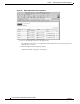
a. From the VPN Console, choose Tools > Task Logs.
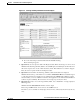
The browser opens and displays the MPLS VPN Solution Task Logs, as shown in Figure 7-1.