
Network Router User Manual

A-6
Cisco 7304 Router MIB Specifications Guide
OL-4925-02
Appendix A Using MIBs
Managing Router Physical Entities
Sample entPhysiclTable Entries
The samples in this section show how information is stored the entPhysicalTable. You can determine the
router configuration by examining the entPhysicalTable entries.
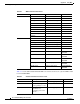
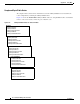
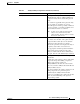
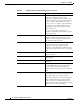
Figure A-1 shows the ENTITY-MIB entPhysicalTable entries for a Gigabit Ethernet line card installed
in slot 1 of the router chassis, and for the port on that line card.
Figure A-1 entPhysicalTable Entries for Chassis Entities
Chassis
entPhysicalIndex
entPhysicalDescr
entPhysicalContainedIn
entPhysicalName
entPhysicalSerialNumber
Chassis Slot
entPhysicalIndex
entPhysicalDescr
entPhysicalContainedIn
entPhysicalName
entPhysicalSerialNumber
Line Card
entPhysicalIndex
entPhysicalDescr
entPhysicalContainedIn
entPhysicalName
entPhysicalSerialNumber
Line Card Port
entPhysicalIndex
entPhysicalDescr
entPhysicalContainedIn
entPhysicalName
entPhysicalSerialNumber
Port Adapter Card
entPhysicalIndex
entPhysicalDescr
entPhysicalContainedIn
entPhysicalName
entPhysicalSerialNumber