
Network Router User Manual

A-5
Cisco 7304 Router MIB Specifications Guide
OL-4925-02
Appendix A Using MIBs
Managing Router Physical Entities
Performing Inventory Management
To obtain information about a particular physical entity in the Cisco 7301 Router walk through the
entPhysicalTable in the ENTITY-MIB. The entPhysicalDescr gives a textual description of the entity.
Using the entPhysicalIndex that corresponds to the description of the entity, you can obtain other
parameters.
Notes about entPhysicalTable Entries
As you examine entries in the ENTITY-MIB entPhysicalTable, consider the following:
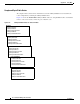
• entPhysicalIndex—Uniquely identifies each entity in the chassis. This index is also used to access
information about the entity in other MIBs.
• entPhysicalContainedIn—Indicates the entPhysicalIndex of a component’s parent entity.
• entPhysicalParentRelPos—Shows the relative position of same-type entities that have the same
entPhysicalContainedIn value (for example, chassis slots and line card ports).
Note The container is applicable if the physical entity class is capable of containing one or more
removable physical entities. For example, each (empty or full) slot in a chassis will be modeled
as a container. All removable physical entities should be modeled within a container entity, such
as field-replaceable modules, fans, or power supplies.